
Below is an example of creating and using JWT auth token using ASP.NET Core Web API.
What is JSON Web Token?
JSON Web Token (JWT) is an open standard that defines a compact and self-contained way for securely transmitting information between parties as a JSON object. This information can be verified and trusted because it is digitally signed. JWTs can be signed using a secret (with the HMAC algorithm) or a public/private key pair using RSA or ECDSA.
Although JWTs can be encrypted to also provide secrecy between parties, we will focus on signed tokens. Signed tokens can verify the integrity of the claims contained within it, while encrypted tokens hide those claims from other parties. When tokens are signed using public/private key pairs, the signature also certifies that only the party holding the private key is the one that signed it.
How to Setup Token :
Open Startup.cs Class. At Method ConfigureServices add below code :
Code :
var tokenHandler = new JwtSecurityTokenHandler();
var key = Encoding.ASCII.GetBytes(_appSettings.Secret);
var tokenDescriptor = new SecurityTokenDescriptor
{
Subject = new ClaimsIdentity(new Claim[]
{
new Claim(ClaimTypes.Name, user.UserInfoId.ToString())
}),
Expires = DateTime.UtcNow.AddDays(7),
SigningCredentials = new SigningCredentials(new SymmetricSecurityKey(key), SecurityAlgorithms.HmacSha256Signature)
};
var token = tokenHandler.CreateToken(tokenDescriptor);
user.Token = tokenHandler.WriteToken(token);

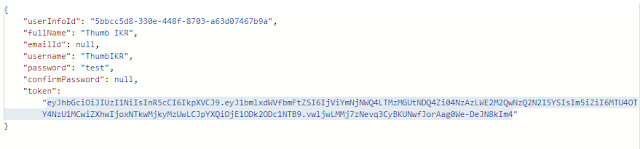
How to Create Token :
var tokenHandler = new JwtSecurityTokenHandler();
var key = Encoding.ASCII.GetBytes(_appSettings.Secret);
var tokenDescriptor = new SecurityTokenDescriptor
{
Subject = new ClaimsIdentity(new Claim[]
{
new Claim(ClaimTypes.Name, user.UserInfoId.ToString())
}),
Expires = DateTime.UtcNow.AddDays(7),
SigningCredentials = new SigningCredentials(new SymmetricSecurityKey(key), SecurityAlgorithms.HmacSha256Signature)
};
var token = tokenHandler.CreateToken(tokenDescriptor);
user.Token = tokenHandler.WriteToken(token);
});
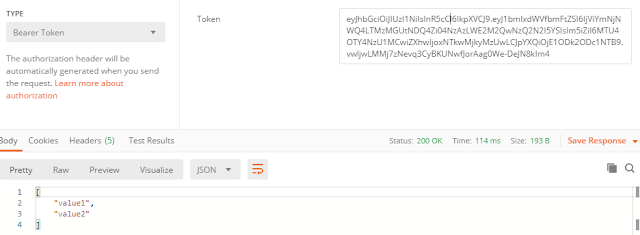
How to Use Token :

Happy Coding...

No comments:
Post a Comment